
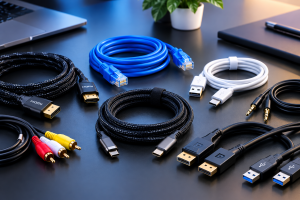
 Cables are one of the most important yet often overlooked accessories in modern technology. From charging smartphones and laptops to connecting monitors, speakers, cameras, gaming consoles, and other electronic devices, the right cable helps your devices communicate, transfer data, and receive power efficiently. Although wireless technology continues to grow, cables remain essential because they can provide reliable connections, fast charging, high-speed data transfer, and stable audio and video performance.
What Are Cables?
A cable is a group of wires or conductive materials covered by protective insulation. Cables are designed to transmit electrical power, digital data, audio, video signals, or a combination of these functions.
Different cables are built for different purposes. For example, a charging cable may be designed primarily for power delivery, while a high-quality USB cable can support both charging and fast data transfer. HDMI cables are commonly used to transmit high-quality video and audio between devices, while Ethernet cables provide wired network connections.
Understanding the purpose of a cable before purchasing it can help you avoid compatibility problems and unnecessary expenses.
USB Cables
USB cables are among the most widely used cables today. They can be used for charging, data transfer, connecting peripherals, and powering compatible devices.
USB-C has become particularly popular because its reversible connector makes it easy to plug in. Depending on the cable and connected devices, USB-C can support fast charging, high-speed data transfer, and video output.
HDMI Cables
HDMI cables are commonly used to connect televisions, monitors, computers, gaming consoles, streaming devices, and other multimedia equipment.
They can transmit digital video and audio through a single cable. Different HDMI standards support different combinations of resolution, refresh rate, and advanced features.
If you are connecting a modern gaming console or high-resolution display, make sure the HDMI cable supports the specifications required by your devices.
Ethernet Cables
Ethernet connectors provide wired internet and network connections. They are frequently used with desktop computers, gaming systems, routers, smart TVs, and other network-enabled devices.
A wired Ethernet connection can offer consistent performance and low latency, making it useful for gaming, streaming, video conferencing, and large file transfers.
Common categories include Cat5e, Cat6, Cat6a, and higher-performance options. The appropriate choice depends on your network equipment and desired speed.
Audio Cables
Audio cables are used to connect headphones, speakers, microphones, amplifiers, and other audio equipment.
Common examples include 3.5mm auxiliary cables, RCA cables, and various professional audio connectors. Although wireless headphones and speakers are increasingly popular, wired audio connections remain useful for home entertainment systems, recording equipment, computers, and professional applications.
Charging Cables
Charging cables are designed to deliver electrical power from a charger, computer, power bank, or other power source to a compatible device.
Smartphones, tablets, smartwatches, cameras, laptops, and other electronics may use different charging connectors. Always check the connector type and power requirements of your device before purchasing a replacement.
A cable capable of supporting higher power does not automatically mean your device will charge at that power. The charger and device must also support the required charging standard.
DisplayPort Cables
DisplayPort cables are commonly used to connect computers to monitors and other display devices. They are particularly popular among PC users, professionals, and gamers who require high-quality video output.
Depending on the version and hardware, DisplayPort can support high resolutions and high refresh rates. It can also carry audio along with video.
If you are upgrading your monitor setup, checking the DisplayPort version supported by your graphics card and monitor is important.
Why Cable Quality Matters
Not all cables are created equally. A low-quality cable may fail quickly, charge slowly, transfer data at lower speeds, or create connection problems.
Good-quality connectors typically use durable materials, reliable connectors, and appropriate internal wiring. Strong strain relief can also help prevent damage where the cable meets the connector.
For example, if your phone only needs basic charging and data transfer, an extremely expensive high-performance cable may not provide meaningful benefits.
1. Check the Connector
First, identify the connectors required by both devices. Common connectors include USB-C, USB-A, HDMI, DisplayPort, Lightning, 3.5mm audio, and Ethernet.
A cable cannot be used effectively if its connectors are incompatible with your equipment.
2. Check Charging Power
For charging connectors, look at the maximum supported power. If you have a device that supports fast charging, choose a cable capable of handling the required power.
Also remember that the charger and device must support compatible charging technologies.
3. Consider Data Speed
If you frequently transfer photos, videos, documents, or other large files, data speed becomes important.
Some cables are designed primarily for charging and may offer limited data-transfer capabilities. Check the cable’s specifications if fast file transfers are important to you.
4. Choose the Right Length
Cable length can make a significant difference in convenience.
A short cable can be useful for power banks and compact desk setups, while longer connection options may be better for televisions, monitors, or devices positioned farther away from a power source.
Avoid choosing a cable that is unnecessarily long if you want a cleaner and more organized setup.
5. Look for Durable Construction
If a cable will be used frequently, durability matters. Features such as reinforced connectors, flexible outer jackets, braided construction, and strong strain relief can help extend its useful life.
However, durability should always be considered alongside flexibility because extremely stiff cables may be difficult to manage.
Cables for Gaming and Entertainment
Gamers often rely on multiple cables to create a complete setup. HDMI or DisplayPort cables can connect a gaming PC or console to a monitor or television, while Ethernet cables can provide a stable wired network connection.
USB accessories are also commonly used for gaming keyboards, mice, controllers, microphones, and other accessories.
For a high-performance gaming setup, choosing cables that support the resolution, refresh rate, connectivity, and network speed of your equipment can help you get the most from your hardware.
Cables for Home and Office
Cables are equally important in home and office environments. Computers, monitors, printers, speakers, chargers, networking equipment, and external storage devices often require wired connections.
Cable management can make a workspace cleaner and easier to maintain. Cable organizers, clips, sleeves, and cable-management boxes can help prevent tangled wires and make it easier to identify individual connections.
Keeping frequently used cables labeled and organized can also save time when troubleshooting equipment.
Are Expensive Cables Always Better?
One common misconception is that the most expensive cable is always the best USB accessories. In reality, cable performance depends heavily on specifications, compatibility, construction, and intended use.
A premium cable can be worthwhile when you need advanced performance, exceptional durability, or specialized features. However, for everyday applications, a properly certified and compatible cable from a reputable manufacturer may be all you need.
Focus on the specifications that actually matter for your device rather than purchasing based solely on price.
The Future of Cables
Wireless technology is advancing rapidly, but cables are unlikely to disappear anytime soon. Wired connections continue to offer important advantages, including reliable power delivery, high-speed data transfer, low latency, and stable connections.
As devices become more powerful, connectors are also evolving. Modern connection standards continue to improve charging capabilities, data speeds, video performance, and compatibility.
USB-C, for example, has become increasingly common across different categories of electronics, helping reduce the number of different connectors consumers need.
Final Thoughts
Cables may seem like simple accessories, but they play a crucial role in today’s connected world. The right cable can help you charge devices efficiently, transfer data quickly, connect displays, improve network stability, and build a reliable home entertainment or office setup.
At Electro Gear Hub, our goal is to help technology users understand their options and make smarter purchasing decisions. Whether you need a USB-C cable for your smartphone, an HDMI cable for your TV, an Ethernet cable for your network, or specialized connectors for your computer and entertainment setup, understanding the basics can make your buying decision much easier.